

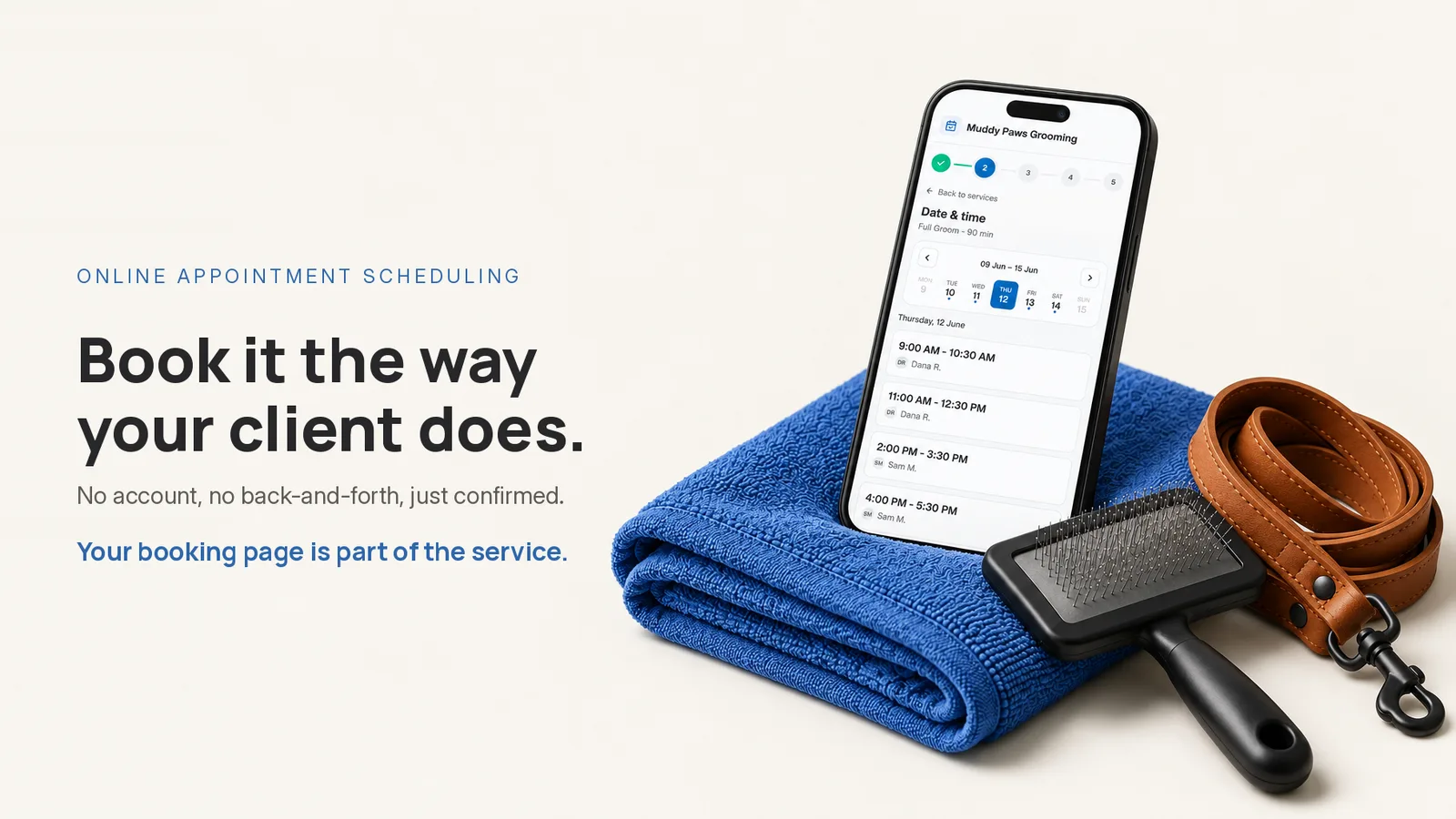
It is nine at night. A dog owner is on the couch, phone in hand, and your name is on the screen because a friend swore you are the one groomer who got their anxious rescue to sit still. She taps your link. What happens in the next thirty seconds decides whether you wake up to a booked Saturday or to another "hi! any openings this weekend?" that you answer sometime tomorrow, after the third dog.
Here is the part that is easy to miss: you will never see those thirty seconds. You know your own page too well to feel what a first-timer feels. So run the test that shows you. Open your link the way a stranger would and book an appointment through your own tool as if you found yourself today. If it makes you create an account, tells you to message to confirm a time, or lets you leave without a confirmation, it is doing exactly that to every client. A booking page should let someone pick a service, pick a time, and get confirmed in one sitting, with an email reminder before the day. That is the bar, and most of the friction that fails it is invisible from behind the counter.
Your booking page is judged from the client's side
You experience your scheduling as work: blocking the diary, moving a 2 p.m., remembering that the doodle needs the long slot. Your client experiences it as thirty seconds of "can I just book this or not." Those are two different products, and the person who decides whether you get the appointment is the one having the thirty-second version.
That is why the useful question is never "is this online booking software easy for me to set up." It is "what does my client hit." And you can only answer it by being the client. Pull up your public link on your phone, in a browser you are not signed into, and go all the way through to a real confirmation. Do it once and you will find things you stopped seeing months ago.
What makes a booking page annoying for clients?
Three kinds of friction quietly send people back to texting you, and every one of them feels reasonable from the inside.
A forced account. Asking a first-time client to create a login before they can book is asking them to join something to buy one grooming. Some will. Many close the tab and text you instead, which drops the booking right back in your lap. Guest checkout, where a client books with a name, an email and a phone number and no password to invent, removes the single most common reason a ready client bails.
A conversation to agree a time. If the page shows your hours but not your actual open slots, the client still has to message you to find out whether Saturday at ten is free. Now you are back in the thread you were trying to escape, except the client thinks they booked. An appointment scheduling system that hides real availability is a contact form wearing a calendar's clothes.
No confirmation. The client fills everything in, taps the button, and the screen just thanks them vaguely. Did it work? They cannot tell, so they text to check, or they book somewhere else to be safe. The moment that says "confirmed, you are in for Thursday at 2" is not a nicety. It is the whole point of the thirty seconds.
Here is the same flow, read from both sides:
| What the client hits | What it costs you |
|---|---|
| "Create an account to continue" | The ready-to-book stranger closes the tab |
| "Message us to confirm a time" | The DM thread you were trying to end |
| A blank screen after booking | A "did it go through?" text, or a booking lost to the next groomer |
What does a clean booking flow feel like?
Short. That is the honest answer. The client taps one shareable link, sees your services, picks Full Groom, picks Thursday at 2, types their name, email and phone, and lands on a confirmation that says it in plain words. No account. No waiting on you. Then reminders go out by email before the appointment, so the slot that got booked is the slot that shows up.
Notice what is not in that description. The client never invented a password. They never waited for you to reply. They never wondered whether it worked. And you never touched your phone. An appointment booking app earns its place by making that half minute boring, pick, pick, confirmed, and by handling the reminders so that you are not the reminder.
For a groomer, boring is exactly right. A full groom can run ninety minutes, and you cannot stop mid-clip to answer "are you open Saturday." Online appointment scheduling a client can finish alone is the difference between the dryer running and your thumbs running.
Book your own page before you commit
Before you sign up for any appointment booking application, run the thirty-second test on it. Set up one real service and open a few times, then send yourself the link and book as a client would. Watch three things:
- Did it make you create an account, or could you book as a guest?
- Could you see and pick a real open time, or did it push you to message someone?
- Did you land on a clear confirmation, with a reminder to follow?
If a tool passes all three, your clients will finish. If it fails even one, you will keep getting the texts, and you will keep answering them between dogs.
You can run that exact test on us. Appointments gives you a shareable booking page with guest checkout, real open times, instant confirmation, and automatic email reminders. The free trial is 30 days with no card, so you can set up a service and book your own live page tonight and feel the thirty seconds for yourself. Start at appointments.glie.ai and be your own client first.